

Task management is an essential part of our business activities. Beyond just keeping an eye on our to-do list, modern knowledge workers need to track their progress to ensure goals will be met, as well as to capture history to run analyses and learn from the past. The Microsoft 365 suite offers a wide variety of capabilities to help with task management, but it’s often difficult to decide which tool is the best fit for a given use case. The purpose of this article is to provide some guidelines. Keep in mind that there is no absolute answer, and there is often a significant overlap between the various tools.
Microsoft To Do
Microsoft To Do is the simplest tool in this list - it is designed for individuals rather than groups. It is the latest evolution of Outlook's Tasks feature, and as such it requires the user's email to be hosted in Exchange Online. Users can create multiple lists, and tasks can have due dates and multiple steps. The mobile version even allows a user to view tasks assigned to them in To Do or Planner.
[caption id="attachment_9476" align="aligncenter" width="628"]
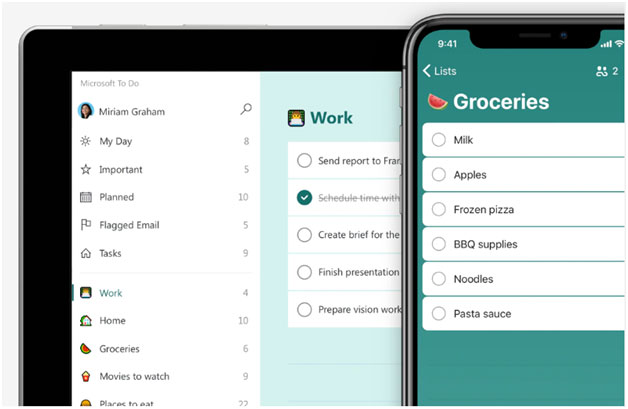
Figure 1: Microsoft To Do. Source: Microsoft[/caption]
Microsoft Planner
Microsoft Planner is the next obvious place to explore when looking at task management. In addition to being designed for groups rather than individuals, its selling points are a convenient Kanban-style board view, built-in reporting, and the Teams app that rolls up all your tasks and to do items from multiple plans and from Outlook in one central place. The ability to view tasks from multiple sources may contribute to some confusion on the app name - in Teams, the app is called Tasks by Planner and To Do, but there are separate mobile apps called Planner and To Do. Both To Do and Planner aim for simplicity, but there is not much room to enhance its capabilities or customize the user interface.
[caption id="attachment_9477" align="aligncenter" width="628"]
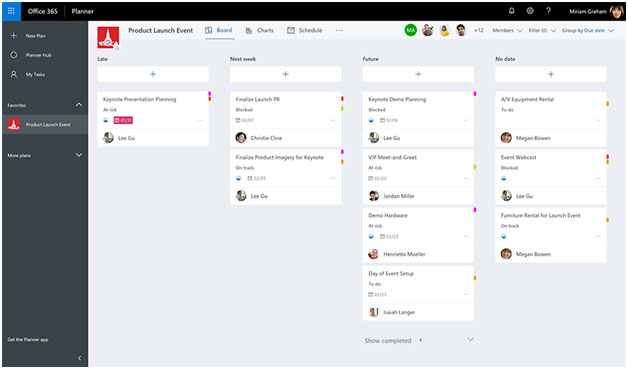
Figure 2: Microsoft Planner board view. Source: Microsoft[/caption]
Microsoft Approvals
The Approvals app within Teams focus on a very specific purpose: to collect a response from a recipient which can lead to multiple tasks. The app's main advantage is its flexibility, allowing respondents to reply with a click from Teams Approvals or Teams chat, or to respond from within an email. If you have a subscription to an e-sign provider such as Adobe Sign or DocuSign, electronic signatures can also be requested via Approvals. Microsoft announced a variety of new features for the Approvals app at its recent Build Conference. In addition to developers being able to leverage Approval tasks in their own applications, many other features are in the works, such as sequential approval, delegation, group approval, etc.
[caption id="attachment_9478" align="aligncenter" width="628"]
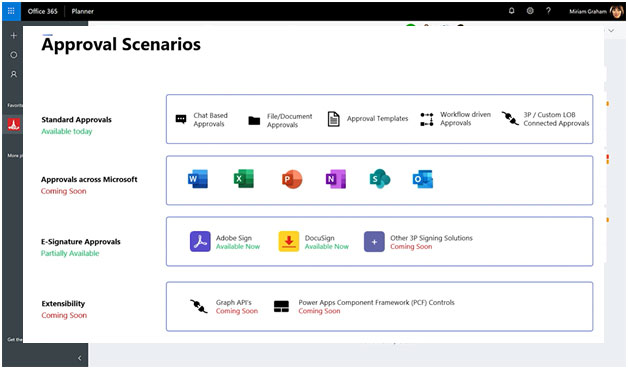
Figure 3: Approval scenarios. Source: Microsoft Build Conference, May 2022.






















Latest News




Creating quality content that help to improve your business is at the heart of what EV is. We aim provide a comprehensive platform that support the growth of young and ambitious entrepreneurs through unique insights and valuable networks
We respect your privacy. The email address you provide will be used solely for subscription purposes and will not be stored or shared.
Subscribe Now